What Is a Trading Platform? The Tool Between You and the Market
A trading platform is the software you use to see charts and place orders — the link between you and the market. What it does, how it differs from a broker, and the main types (MT4, MT5, cTrader, web terminals), explained for beginners.
Key point — A trading platform is the software that links you to the market. It shows prices and charts, routes your orders to the market through a broker, and manages your account and P&L. There are installed platforms like MT4, MT5, and cTrader, plus web terminals — and the platform (the tool) is not the same as the broker (who provides the account and execution).
What a trading platform does
The word “platform” sounds vague, but its job is concrete. It’s the screen where you see prices, place orders, and manage your account — that’s a trading platform. Specifically, it does four things.
- Displays prices and charts — live prices for products like gold or the Nasdaq, plus candlestick charts and indicators.
- Routes orders — sends the market or limit orders you click through a broker to the market.
- Manages positions and P&L — your open positions, live profit and loss, and margin at a glance.
- Provides risk tools — stop-loss (SL), take-profit (TP), and position closing.
Where the platform sits
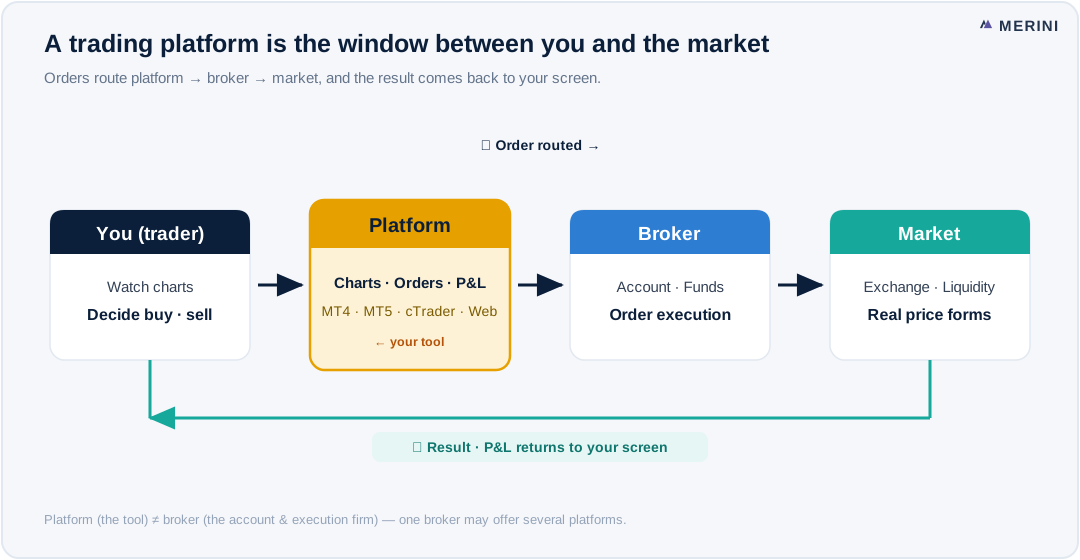
As the diagram shows, the platform is the window between you and the market.
You (the trader) → platform (chart & order screen) → broker (account & execution) → market
When you look at a chart and hit “buy,” the platform passes that order to the broker, the broker executes it in the market, and the result comes back to your platform screen. In short, the platform is the interface through which you talk to the market.
Platform ≠ broker (the key thing beginners confuse)
This is the single most common point of confusion.
- Broker = the company that opens your account and handles actual execution and funds.
- Platform = the software (tool) you use to trade that account.
The same MT5 can be used at Broker A or Broker B, and conversely one broker may offer both MT5 and cTrader. Which platform you use is usually decided by the broker. So rather than “MT5 is good/bad,” it’s the broker’s execution and costs that drive your actual trading quality.
Types of platform
| Type | Examples | Traits |
|---|---|---|
| Installed (desktop) | MT4 & MT5, cTrader | Feature-rich, requires install |
| Web terminal | Browser-based | No install, access anywhere |
| Mobile app | iOS & Android | Monitor and trade on the go |
The classic installed platforms are MetaTrader (MT4/MT5) and cTrader, while install-free web trading platforms have grown popular for their low barrier to entry.
How to choose
- Broker support — whatever your broker offers comes first.
- Asset classes — FX only, or indices and commodities too? → MT4 vs MT5
- Web vs installed — web for multiple devices and simplicity, installed for pro features.
- Automation — EAs (MQL) vs cBots (C#). Irrelevant if you won’t use it.
- Total cost — spread and commission matter more than the platform.
On any platform, the leverage risk is the same. Fancy tools don't guarantee profit. Rules for stop-losses and margin come before the tool.
Watch the four pieces react to each other
The four jobs listed at the top of this article are hard to picture separately and obvious the moment you see them wired together. In Merini’s free web demo the chart, the order ticket, the positions panel and the account summary sit on one screen: place a small order and watch the position appear, the P&L start moving with each tick, and the margin figure in the account summary change to match. That single loop is what “the platform is the interface between you and the market” actually means — and it is also where you first watch free margin fall as a position goes against you. Merini is neither MT5 nor cTrader, so treat this as learning the shape of a trading screen rather than trialling a specific product: signup is email-only, prices are live, the money is virtual, and no order you place reaches a broker or the market → See the pieces connect
Frequently asked questions
Is a trading platform the same as a broker?
No. The broker is the company handling accounts and execution; the platform is the software you trade with. One broker may offer several platforms.
Do platforms cost money?
Platform fees are usually covered by the broker, so they’re often free to the trader. The real cost is the spread and commission on each trade.
Which platform should I learn first?
If you’re starting today, get a feel with the widely supported MT5 or an install-free web terminal. Practice on a demo first.
Can I trade with just a platform?
No. The platform is only the tool; to trade for real you need a broker account. If you only want to practice, a demo is enough without an account.
Related → MT4 vs MT5 · What is cTrader? · What is a web trading platform? · MT5 vs cTrader
This content is for information and education only and is not investment advice or solicitation. Trading conditions (hours, margin, fees, tick value, etc.) vary by exchange, broker, time, and daylight saving — always verify with your own broker before trading. Derivatives trading can result in losses exceeding your deposit.