What Is a Web Trading Platform? Trading in the Browser, No Install
A web trading platform (web terminal) lets you trade from the browser without installing software like MT5 or cTrader. How it compares to desktop platforms, the trade-offs, and how to start practicing on live prices with no download.
Key point — A web trading platform (web terminal) lets you view charts and place orders straight from a browser, with no software to install. Instead of the desktop versions of MT5 or cTrader, you just log in and the same screen loads on any device or OS. You skip installs and updates — at the cost of depending on your browser and internet connection.
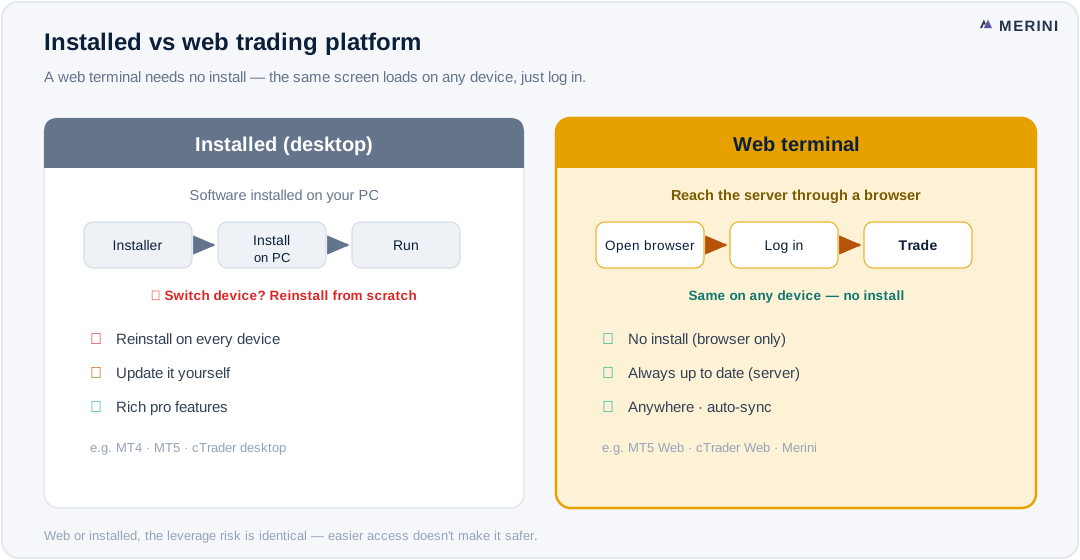
What a web trading platform is
Traditionally, platforms like MT5 or cTrader required you to download and install software on a PC. A web trading platform removes that step: open a URL in Chrome, Safari, or any browser and the charts, quotes, and order ticket appear right there. It’s often called a “web terminal.”
The essence is no installation. No heavy installer, no version updates, no OS-compatibility worries. When you log in, your chart settings and watchlists are stored server-side, so they follow you to any device you sign in from.
Desktop vs web at a glance
| Feature | Desktop (installed) | Web trading platform |
|---|---|---|
| Install | Download and install | None (browser only) |
| Updates | Manual/auto updates | Always current (server-side) |
| Switching devices | Reinstall per device | Just log in |
| OS limits | Often Windows-centric | OS-agnostic |
| Offline | Some screens persist | Internet required |
| Advanced tools | Richer pro features | Core-feature focused |
Why traders use the web version
- Accessibility — work PC, laptop, or tablet: if it has a browser, you’re in. It even works where you don’t have permission to install software.
- Zero maintenance — updates happen on the server, so you’re always on the latest version. No “can’t log in after the update” headaches.
- Sync — chart layouts, indicators, and watchlists are tied to your account and carry across devices.
- Lightweight — start instantly, no installer. It’s the lowest-barrier way in for anyone new to trading.
The trade-offs
The web isn’t a free lunch.
- Internet-dependent — lose your connection and you lose access to quotes and orders. A stable line is assumed.
- Browser performance — charts can feel heavy on old browsers or low-spec devices.
- Niche pro features — some specialist desktop capabilities (like running complex EAs) remain richer on installed platforms. That said, the core features most traders actually use — charts, orders, stop-loss/take-profit, margin math — are well covered on the web.
Web or desktop, the risk is identical. Leverage magnifies losses by the same ratio it magnifies gains, and easier access doesn't make trading safer. Without rules, you can lose quickly.
The web versions of MT5 and cTrader
Both MT5 and cTrader ship web versions (MT5 Web Terminal, cTrader Web). If you have a broker account, you can reach them from a browser without installing. How complete and capable each web build is varies by broker and platform, so it’s worth checking that charts, orders, and core tools work well before you rely on them.
Try it now, with no install
The fastest way to feel web trading is a demo. You place orders on live prices with virtual funds, so you can learn the screen, the order flow, and stop-losses without risking money.
Merini is a browser-based web terminal for trading gold (XAUUSD), the Nasdaq (NQ), and the Hang Seng (HSI) on live prices. Sign up with an email and a virtual-funds demo opens immediately — desktop-grade charts, one-click orders, stop-loss/take-profit, and margin math on the same screen you’d trade on for real. Live accounts connect through a broker such as cTrader → Open the web demo
Frequently asked questions
Is a web trading platform slower than a desktop one?
That was the old perception, but modern web tech makes chart and order responsiveness more than adequate for real use. Perceived speed depends more on your internet line and device than on the platform itself.
Is the web version safe?
The connection itself is protected by the browser’s HTTPS encryption. The bigger security factor isn’t the platform type but your account habits — a strong password, two-factor authentication, and logging out on shared computers.
Does it work on mobile?
Yes. A web terminal loads anywhere there’s a browser, including tablets and phones. On smaller screens, though, chart and order controls can be more limited than on desktop.
Are there cases where I still need a desktop platform?
If you need specific pro features — like running complex automated strategies (EAs) — an installed platform can have the edge. But for chart analysis and manual trading, the web is usually enough.
Related → What is a trading platform? · MT5 vs cTrader · MT4 vs MT5 · How to get started
This content is for information and education only and is not investment advice or solicitation. Trading conditions (hours, margin, fees, tick value, etc.) vary by exchange, broker, time, and daylight saving — always verify with your own broker before trading. Derivatives trading can result in losses exceeding your deposit.